Posted on

How to install The Gallery System

Gallery installer in black workwear measuring a blank white wall beside a stepladder.

Safety first

Before drilling, check both sides of the wall and consider where electrical, water and gas services may run. Detection tools are helpful but imperfect. Use a stable ladder or platform, wear suitable eye and hearing protection, and control dust. If the wall construction or service location is uncertain, stop and engage an appropriately qualified person.

Before you begin

This guide begins after you have selected your Gallery System. Use the Gallery System calculator to confirm track quantities and the Gallery System product guide for hanger, hook and load compatibility.

Gallery Systems’ published instructions provide the installation sequence. The Shakespeare Solutions field notes throughout this guide add practical detail learned from installing the system on a wide range of Australian walls.

Tools and protective equipment

  • Tape measure, pencil and marker
  • Stud finder suited to the wall
  • Spirit or laser level
  • Drill and material-appropriate bits
  • 4 mm metal bit for the track
  • Driver or screwdriver
  • 24 TPI or finer hacksaw and a mitre box
  • Drop saw with an aluminium blade, if preferred
  • Metal file
  • Hammer and, if required, a clean plastic mallet
  • Stable ladder or work platform
  • Vacuum or dust extraction
  • Eye and hearing protection plus suitable respiratory protection

Working practically: the track is supplied without fixing holes so it can be drilled to suit the wall. A two-metre track can usually be managed by one confident person; a second pair of hands is particularly useful with three-metre lengths and longer runs.

1. Plan the track position and access

The Gallery System track is larger than Slimline and is screwed directly to the wall through the upper channel of its H-shaped profile. Check every wall before drilling and plan both the finished position and how hangers will enter the track.

  • Straight corniceThe track can be installed directly beneath it when the drill can reach the upper fixing channel without damaging the cornice.
  • Square-set ceilingUsually sit the track down slightly. The fixing hole is drilled through the top of the track, making it difficult to hold a drill square when the track is tight against the ceiling.
  • Very high ceilingConsider keeping the track lower so it remains accessible from a normal stepladder. About 2.6 metres from the floor is often a sensible height.
  • Strong architectural lineA door head or former picture-rail height can provide a considered alternative.
  • Clear Tape hangersLeave an accessible track end or a loading gap of at least 40 mm where hangers can be added and removed without sliding them several metres along a long run.

If Gallery Lighting may be added later: install a continuous track run, leave a 40 mm gap at corners, keep the track no higher than approximately 2.6 metres and allow at least 15 mm below the ceiling or cornice so lighting wands can be fitted and removed. Power is introduced through a junction box; a section of track can be cut out for it when the lighting is installed.

Clear Tape needs end access. Stainless-steel cable and Clearline hangers use a removable track slide and can be inserted at any point, so loading gaps are not required for those hanger types.

2. Drill and set out each track length

Gallery Systems instruction

Use the V-groove in the top of the track as the drilling guide. The manufacturer specifies at least five fixings per two-metre length, with holes near each end and the remaining holes approximately 400-500 mm apart. Read the Gallery System Track instructions (PDF).

Shakespeare Solutions field notes

Use five fixings for a two-metre track and seven for a three-metre track. We almost always include a centre fixing, even when it does not coincide with a stud, because it balances the track while the remaining positions are marked and makes the length easier to install and remove.

  1. Locate the practical studs. Mark the stud positions, then place the track against the wall and transfer those positions onto its upper V-groove.
  2. Plan the full fixing pattern. Include the centre hole, keep the end holes at least 20 mm from the ends and add intermediate positions so the track is supported evenly.
  3. Drill the track. Use a 4 mm metal bit for the supplied 8-gauge screws. Support the track securely and remove any burrs that could stop it sitting flat.
  4. Use the centre fixing first. Hold the track at the selected height, fix or temporarily support it at the centre, align it and mark the remaining holes on the wall.
  5. Remove the track. Prepare the remaining wall fixings using the appropriate method in Step 3, then return the track for final installation.
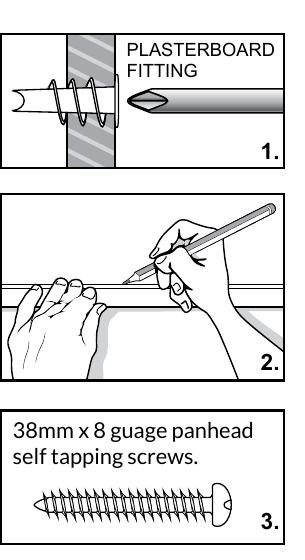
Gallery Systems diagrams showing a plasterboard fitting, marking the wall with the track and the recommended 8-gauge screw
The track is used as the fixing template.

Do not force every fixing onto a stud. Prioritise every practical stud, then use a suitable hollow-wall fixing where the planned pattern falls between studs.

3. Prepare fixings for the wall type

Gallery Systems instruction

The manufacturer illustrates direct fixing into studs, Wallmate-style plasterboard fittings and masonry plugs. See the manufacturer’s fixing sequence (PDF).

Shakespeare Solutions field notes

First assess the substrate—the type of wall you are working on—then prepare each marked position. Plasterboard on timber or steel studs and solid masonry are the two most common constructions.

Plasterboard walls

Timber studs: fix the track directly with the supplied 8-gauge screw. Where no stud is available, use a suitable Wallmate, toggle or other plasterboard fixing.

Installing a Wallmate accurately: start with a small pilot hole to confirm that no stud is present, then use a drill bit approximately the same width as the Wallmate’s cutting tip to form an accurately centred opening before driving it.

Steel studs: a StudBuddy magnetic stud finder is particularly useful. Start with a 2 mm pilot, enlarge it to a 3 mm hole, then drive the 8-gauge screw. Carry spare 2 mm bits on longer installations.

Fire-rated or acoustic board: nylon Wallmates can crack in harder boards. Use a zinc Wallmate or another fixing approved for the substrate; we often use TOX Deco 6/41 all-purpose wall plugs.

Square-set plasterboard: pressed-metal corner bead can prevent a Wallmate passing through near the ceiling. Sit the track down where practical, or drill an accurate opening and use a TOX Deco 6/41 plug.

Masonry and brick walls

Use a rotary hammer with a suitable SDS masonry bit and hold dust extraction beneath the hole. A four-point bit tends to wander less.

For a TOX Deco 6/41 plug, we normally drill a 5.5 mm wall hole. A standard red Star Plug normally uses a 6 mm hole. Follow the fixing manufacturer’s current screw, diameter and embedment specifications.

Start smaller in friable old brick or unstable render and enlarge carefully. If a plug spins in an isolated powdery hole, we will often use hot-melt glue to hold it while the screw expands the plug. If it happens repeatedly, reduce the drilled-hole diameter or reconsider the fixing method.

Other wall surfaces

Lath and plaster: do not drive a Wallmate into this brittle material. Drill slowly and fix into sound timber lath where possible. If a required position passes through a gap, carefully enlarge the opening and use a TOX Deco 6/41 plug, recognising that the available capacity is less certain.

Tiled surfaces: pass through the tile slowly with a tile-appropriate diamond bit or hole saw, then identify and fix to the substrate behind it rather than treating the tile as structural.

4. Cut, install and join the track

Gallery Systems instruction

The manufacturer supplies the track undrilled so fixing positions can be matched to the wall. Refer to the Gallery System Track instructions (PDF).

Shakespeare Solutions field notes

Work progressively. Measure for ordering, but mark final cuts against the actual wall as the installation proceeds.

  1. Mark the fitted length. At a perpendicular wall, reverse the track against the wall and transfer the cut position, allowing about 1 mm tolerance unless a planned loading or lighting gap is required.
  2. Make a cool cut. Support the track in a mitre box and use a 24 TPI or finer hacksaw, or clamp it securely and use a drop saw fitted with an aluminium blade.
  3. True the end. Remove burrs with a metal file. Factory ends can be joined as supplied, but removing approximately 0.5-1 mm or carefully filing away the powder coating can produce a cleaner, squarer joint.
  4. Fix the first length. Start with the centre fixing, confirm the track is correctly aligned and then secure the remaining positions, taking care not to distort the H-shaped profile.
  5. Join the next length. Insert a Gallery System Track Joiner into the first length, position the next track, slide the joiner across the junction and tighten its two grub screws.

Joiners are now our usual approach: tracks can be butt-joined without one, but small wall or fixing variations can leave the ends a millimetre or two out of alignment. A joiner keeps the junction neat and true. It also prevents a dropper passing through the join. Stainless-steel cable and Clearline hangers can simply be removed and reinserted on the other side; omit the joiner only when uninterrupted passage is specifically required.

Do not use an abrasive hot saw intended for steel. Use a hacksaw and mitre box or a drop saw with an aluminium blade.

5. Finish corners and track ends

For a picture-hanging-only installation, stop each track at the corner and fit an end cap to the exposed end. At an internal corner, the tracks can finish slightly short rather than being forced into an imperfect junction.

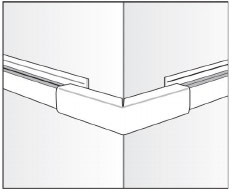
When preserving the 40 mm corner gap for future Gallery Lighting, stop both tracks short and use the lighting system’s internal or external corner cover to conceal the gap and, later, the connecting cable. These covers can also provide a neat corner finish before lighting is added.

Keep the lighting plan consistent around the room. A mixture of tight corners and accessible lighting gaps can make a later retrofit unnecessarily difficult.

6. Add the selected hangers

Gallery Systems instruction

Clear Tape is assembled around its locking capsule and inserted through a track end. Stainless-steel cable and Clearline use a track slide that can be inserted from below at any point. Review the applicable instructions before use: Clear Tape and stainless-steel cable and Clearline.

Hanger installation

Clear Tape

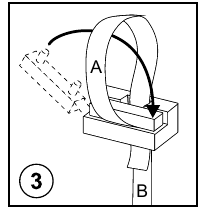
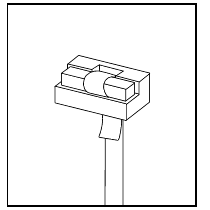
Cut the required tape length, feed it through the capsule to form a loop and swing the locking bar through the loop. The short end of the tape and the locking bar must face the front or the locking action will fail. Pinch the capsule and insert it through an accessible track end.
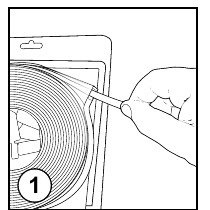
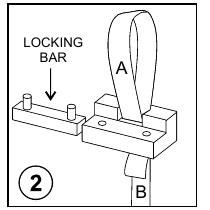
Clear Tape assembly step 1: cut the tape to length
Clear Tape assembly step 2: pass the tape through the locking capsule
Clear Tape assembly step 3: swing the locking bar through the loop
Clear Tape assembly step 4: completed locking capsule

Assemble the capsule, then load it through a track end.

Stainless-steel cable and Clearline

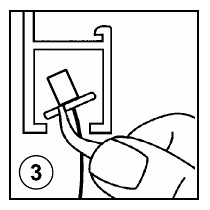
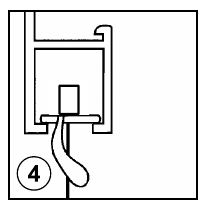
Feed the hanger through its track slide, tilt the slide into the underside of the track and straighten it so it sits level. Both hanger types are installed in the same way and can be added or removed anywhere along the track.
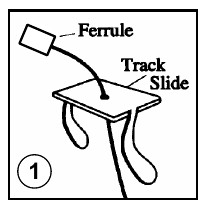
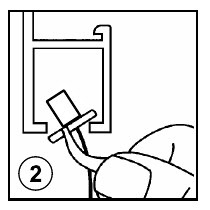
Track-slide hanger step 1: feed the hanger through the track slide
Track-slide hanger step 2: tilt the slide into the track
Track-slide hanger step 3: rotate the slide within the track
Track-slide hanger step 4: straighten the slide so it sits level

Tilt the slide into the track, then straighten it.

7. Fit hooks and hang artwork

Gallery Systems instruction

Allen Key Hooks are loosened, positioned and retightened with the supplied key. Push Button Hooks move freely while the button is held and grip when it is released. Check compatibility in the product guide and review the Allen Key Hook and Push Button Hook instructions.

  • Single hanging: place one hook beneath the centre of the picture wire.
  • Double hanging: use two D-rings or equivalent mounting points. Do not place two hooks on one wire; they can creep towards the centre.
  • Use two droppers when approaching a single-dropper limit, when the artwork needs help staying level, for visual balance or where it may occasionally be disturbed.
  • Do not add a third dropper to gain capacity. If two correctly rated droppers are insufficient, use another method such as a Z Bar or French cleat.
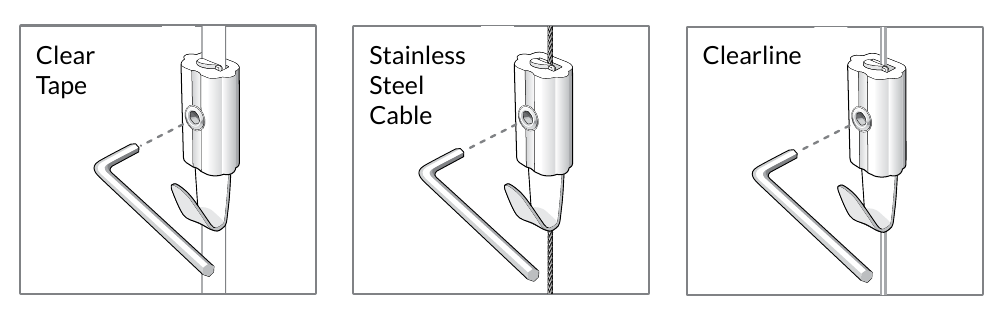
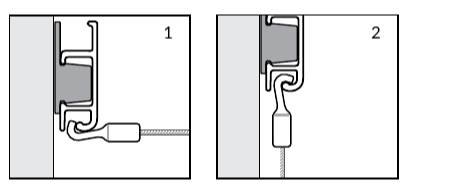
Gallery Systems diagrams showing Allen Key Hooks fitted to Clear Tape, stainless-steel cable and Clearline hangers
Use the hook that matches the selected hanger.

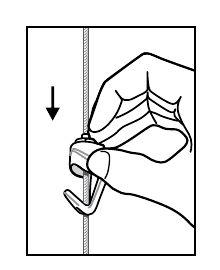
For a Push Button Hook, feed the matching hanger into the top of the hook, hold the button while setting the height and release it to grip. As a starting point, position the centre of the artwork at approximately the viewer’s eye height, then adjust it to suit the room.
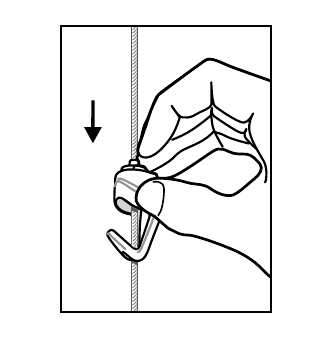
Gallery Systems diagram showing a Push Button Hook being adjusted on its hanger
Hold the button while adjusting the hook.

Troubleshooting

The adjoining track ends do not align cleanly

Small differences in the wall or fixing positions can leave butt-joined lengths slightly out of alignment. Fit a Gallery System Track Joiner across the junction to draw the two ends into a neat, consistent line.

Adding Clear Tape hangers requires too much sliding

Clear Tape capsules can enter only through a track end. Use the nearest accessible end or planned loading gap. If Clear Tape will be used regularly on a long run, create practical loading points rather than relying on one distant end.

A dropper cannot pass through a track join

A Track Joiner occupies the inside of the track and prevents droppers passing through. Stainless-steel cable and Clearline hangers can be removed and reinserted on the other side. If uninterrupted Clear Tape movement is essential, that junction must be planned without a joiner.

Manufacturer instructions

Keep the original Gallery Systems sheets with the system for their diagrams and component instructions.

If the wall construction is uncertain or this kind of work is not for you, find an authorised Gallery Systems installer.

Posted on

How to install the Slimline Art Hanging System

Installer on a stepladder drilling a pilot hole just below the cornice.

Safety first

Before drilling, check both sides of the wall and consider where electrical, water and gas services may run. Detection tools are helpful but imperfect. Use a stable ladder or platform, wear suitable eye and hearing protection, and control dust. If the wall construction or service location is uncertain, stop and engage an appropriately qualified person.

Before you begin

This guide begins after you have selected your Slimline system. Use the Slimline calculator to confirm track quantities and the Slimline product guide for hanger, hook and load compatibility.

Gallery Systems’ published instructions provide the installation sequence. The Shakespeare Solutions field notes throughout this guide add practical detail learned from installing the system on a wide range of Australian walls.

Tools and protective equipment

  • Tape measure and pencil
  • Stud finder suited to the wall
  • Spirit or laser level
  • Drill and material-appropriate bits
  • Driver or screwdriver
  • 24 TPI or finer hacksaw and a mitre box
  • Drop saw with an aluminium blade, if preferred
  • Metal file
  • Hammer and, if required, a clean plastic mallet
  • Stable ladder or work platform
  • Vacuum or dust extraction
  • Eye and hearing protection plus suitable respiratory protection

Working practically: a two-metre track can usually be installed by one confident person, although a second pair of hands helps. Allow extra time for the first length while you learn how the particular wall behaves. For a long run, a stable work platform can be more practical than repeatedly repositioning a stepladder.

1. Choose the track position

In many environments, the track looks most discreet immediately beneath a straight cornice or square-set ceiling. Before drilling, check every wall where the system will be installed and consider the alternatives below; a ceiling can look straight while varying substantially across a room and throughout the premises.

  • Straight ceiling or corniceInstall directly beneath it. If drilling tightly against a square-set ceiling, plan how the drill will reach each fixing position; an offset drill can make this easier and reduce the risk of damaging the ceiling.
  • Minor variation of about 2-3 mmA neat caulking bead can conceal small gaps.
  • Noticeable waves or curvesDo not force the track to follow them. Establish a deliberate line, often 30-50 mm below the lowest point.
  • Very high ceilingConsider keeping the track lower so an average person can reach it safely from a normal stepladder. About 2.6 metres from the floor is often a sensible height. If the track will be installed higher, plan how it will be accessed whenever droppers need to be added or removed.
  • Strong architectural lineA door head or former picture-rail height can provide a considered alternative.

Installer’s note: compare a laser line with the visible ceiling line. In an older building, a slight rake parallel to the ceiling can look better than a perfectly level track with a visibly widening gap.

2. Set out one track length at a time

Gallery Systems instruction

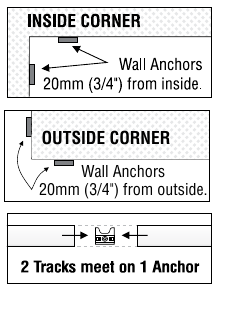
Use five wall anchors for each two-metre track and place an anchor at every track join and corner. Read the Track and Wall Anchors instructions (PDF).

Shakespeare Solutions field notes

Work progressively rather than marking the whole room at once. Each wall anchor has two locating tabs at the top. Keep these tabs facing upwards: they can register against a straight hard edge and show where the top of the installed track will finish.

  1. Position the first track. Hold the first length where it will be installed and mark its far end or join position.
  2. Plan the anchors for that length. Put an anchor at the join, then use the appropriate plasterboard or masonry method in Step 3 for the remaining positions.
  3. Install the first length. Fix and align its anchors, then clip the track into place before moving on.
  4. Continue along the wall. Butt the next length against the installed track, mark its far end or next join and repeat the process. Mark and cut the final length against the actual wall.
  5. Check the quantity. Five anchors per two-metre track is the recommended minimum. A shortened one-metre section will often use three rather than two.
Gallery Systems diagram showing Slimline anchor positions at inside corners, outside corners and track joins
Manufacturer anchor placement at corners and joins.

At every join: centre one standard wall anchor behind the join so each track end shares approximately half of the anchor.

3. Fix the anchors for your wall type

Gallery Systems instruction

The manufacturer illustrates each wall anchor secured with a fixing appropriate to the wall. Its plasterboard example uses a screw-in hollow-wall fixing. See the manufacturer’s anchor sequence (PDF).

Shakespeare Solutions field notes

First assess the substrate—the type of wall you are working on—then follow the appropriate route below. Plasterboard on timber or steel studs and solid masonry are the two most common constructions. When the wall construction is unfamiliar, test an ordinary anchor position before drilling a critical join position.

Plasterboard walls

Find the practical studs first. Shakespeare Solutions prefers to fix into every sensibly positioned timber or steel stud, then use suitable plasterboard fixings to support the track between them. This is an additional belt-and-braces preference; the manufacturer permits correct fixing directly into plasterboard.

Timber studs: fix the wall anchor with the supplied 8-gauge screw. Where no stud is available, a small pilot confirms the hollow section before a suitable plasterboard fixing is installed.

Installing a Wallmate accurately: nylon Wallmates suit ordinary plasterboard. Start with a small pilot hole to confirm that no stud is present, then use a drill bit approximately the same width as the Wallmate’s cutting tip to form an accurately centred opening before driving it. This helps prevent the Wallmate wandering away from the intended anchor position.

Steel studs: a StudBuddy magnetic stud finder is particularly useful. Start with a 2 mm pilot, enlarge it to about 2.5-3 mm, then drive the 8-gauge screw. Make the first test fixing away from a join so a broken bit or screw does not compromise that essential position. Carry spare 2 mm bits when installing a longer run: drilling through plasterboard dust and then into steel can wear these small bits quickly.

Fire-rated or acoustic board: nylon Wallmates can crack in these harder boards. Use a zinc Wallmate or another fixing approved for the substrate; we often use TOX Deco 6/41 all-purpose wall plugs in this situation.

Square-set plasterboard: the junction where the wall meets the ceiling is often reinforced with pressed-metal corner bead. A Wallmate cannot be installed through this bead. In this situation, drill an accurate opening and use a TOX Deco 6/41 plug, following the fixing manufacturer’s current drill and screw specifications.

Masonry and brick walls

Position the anchors evenly, retaining the required anchor at each join. Use a rotary hammer with a suitable SDS masonry bit; a four-point bit tends to wander less. Hold dust extraction directly beneath the hole, especially where red-brick dust could mark a pale wall.

Use a wall plug suited to the substrate. Shakespeare Solutions commonly uses TOX Deco 6/41 all-purpose wall plugs. Start smaller in friable old brick or unstable render and enlarge carefully. In hollow brick, select a fixing designed to expand or knot behind the hollow section.

If a plug spins in old, powdery brick: remove the plug if possible and clean the hole. We will often place hot-melt glue in the hole and then push the wall plug back into position. The glue holds it while the screw expands the plug. If this happens repeatedly, reduce the drilled-hole diameter or reconsider the drilling and fixing method.

Near a square-set masonry ceiling, check tool clearance before committing to the track height: the body of a rotary hammer may prevent drilling immediately beneath the ceiling.

Other wall surfaces

Lath and plaster: do not screw a Wallmate into this brittle material. Start with a 2 mm pilot and drill slowly. If the hole reaches sound timber lath, fix into it. If it passes through a gap between the laths, moving the anchor slightly left or right may locate timber. Where the anchor must remain in that position, carefully enlarge the opening and install a TOX Deco 6/41 plug. The construction behind old lath and plaster can be difficult to assess, so the capacity of this fallback fixing is less certain; use conservative judgement and do not rely on it for a demanding load.

Tiled surfaces: pass through the tile slowly with a tile-appropriate diamond bit or hole saw, then identify the substrate behind it. Select the fixing for that material rather than treating the tile as structural.

4. Cut and join the track

Gallery Systems instruction

The manufacturer permits the aluminium track to be cut to the required length and shows the standard join arrangement. Refer to the Track and Wall Anchors instructions (PDF).

Shakespeare Solutions field notes

Measure for ordering, but mark final cuts against the actual wall as the installation progresses. Walls and corners are rarely exact.

  1. Mark the fitted length. At a perpendicular wall, reverse the track against the wall and transfer the cut position, allowing about 1 mm tolerance.
  2. Support it securely. Use a mitre box for a hand cut or clamp the track securely for a powered cut. Protect the visible powder-coated face.
  3. Make a cool cut. Use a 24 TPI or finer hacksaw, or a drop saw fitted with an aluminium blade.
  4. Finish a cut end. Remove burrs with a metal file and make sure the cut is square.

Joining two lengths: the powder-coated factory ends can be joined as supplied. For the neatest joint, remove the coating at the meeting ends by trimming approximately 0.5-1 mm with a drop saw fitted with an aluminium blade, or by carefully filing away the coating. The aim is simply to remove the powder coating and true the edge. Line the two lengths up before installation and confirm the ends meet squarely and cleanly.

Do not use an abrasive hot saw intended for steel. Heat can damage the aluminium track’s powder-coated finish.

5. Finish corners and uneven walls

Gallery Systems instruction

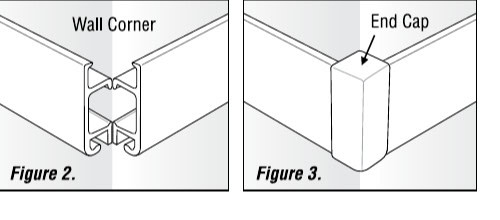
At an outside corner, two square-cut track ends meet and one Slimline end cap covers the junction. Read the End Caps instructions (PDF).

Shakespeare Solutions field notes

Inside corner: run one track to the perpendicular wall and butt the second against it. End caps are normally unnecessary. Avoid mitres; this small profile makes inaccuracies obvious.

Outside corner: finish both tracks flush with the wall edges and use one end cap to cover the meeting ends.

Gallery Systems diagrams of Slimline track meeting at an outside corner before and after fitting the end cap
One end cap covers both track ends at an outside corner.

6. Snap on the track and fit the end caps

Gallery Systems instruction

Clip the track progressively over the installed anchors, then fit the end caps in the orientation shown by the manufacturer. Track instructions End cap instructions.

Shakespeare Solutions field notes

  1. Check every anchor. Confirm it is secure, aligned and installed with the two locating tabs facing upwards.
  2. Start just clear of a perpendicular wall. Position the track about 2-3 mm from the wall and tap it onto the first anchors. Once engaged, slide it gently towards the wall. This helps prevent the end of the track grazing the finished surface.
  3. Work progressively along the track. Tap the visible face into place using the flat edge of your hand. A clean plastic mallet can be used gently where necessary.
  4. Inspect and finish. Confirm the track has engaged every anchor, then insert the end cap with its curved section at the bottom.

7. Add droppers, hooks and artwork

Gallery Systems instruction

Insert the selected hanger into the track and use the matching hook as illustrated in the component sheets. Review the applicable instructions before use: clear tape and stainless cable, Mini Hook and Push Button Hook.

Shakespeare Solutions field notes

Insert the clear tape, Clearline or stainless-steel cable hanger into the track horizontally, then rotate it down. Refer to the product guide for compatibility and weight limits.

  • Single hanging: place one hook beneath the centre of the picture wire.
  • Double hanging: use two D-rings or equivalent mounting points. Do not place two hooks on one wire; they can creep towards the centre.
  • Use two droppers when approaching a single-dropper limit, when the artwork needs help staying level, for visual balance, or where it may occasionally be disturbed.
  • Do not add a third dropper to gain capacity. Sharing the load evenly across three is unreliable. If two correctly rated droppers are insufficient, use another method such as a Z Bar or French cleat.
Gallery Systems two-step diagram showing a Slimline hanger inserted horizontally and rotated down into the track
Insert horizontally, then rotate down.
Gallery Systems diagram showing the button pressed to adjust a Slimline Push Button Hook
Press the button while adjusting the hook.

As a starting point, position the centre of the artwork at approximately the viewer’s eye height, then adjust it to suit the room. The system is designed to make this easy. When changing artwork, inspect the droppers and hooks for visible damage before reuse; no other routine maintenance is normally required.

Troubleshooting

The ceiling is wavy and gaps appear above the track

Small gaps of about 2-3 mm can often be caulked. For larger variations, sit the track a deliberate distance below the ceiling or cornice and keep that distance consistent along the wall. The intentional gap helps minimise the visible imperfections above it.

The track will not clip onto an anchor in a wall depression

If the wall moves in and out, an anchor positioned in a local depression may sit too far back for the track to engage correctly. Remove that anchor and pack it out slightly so its face aligns with the surrounding anchors, then refit it. Once the track is installed, the small packer will usually be concealed.

I need to remove an installed track

Removal is possible but can be difficult. Follow our separate guide to removing Slimline track.

Manufacturer instructions

Keep the original Gallery Systems sheets with the system for their diagrams and component instructions.

If the wall construction is uncertain or this kind of work is not for you, find an authorised Gallery Systems installer.
Posted on

How to install The Gallery Lighting System

Gallery Lighting System installation guide – planning the lighting layout

Safety first

The lighting side of the system operates at 12 volts and is designed for DIY handling. Do not alter the 240-volt plug, lead or mains supply. A new power point, concealed mains wiring or any other change to the 240-volt supply must be completed by a licensed electrician. Keep the transformer switched off while the track cable and light wands are being installed.

Mount the transformer where it remains accessible and well ventilated. A transformer placed above a ceiling must not be buried in insulation or sealed into an inaccessible void. Check the proposed location with your electrician before the track or cable is cut.

Before you begin

This guide covers adding Gallery Lighting to The Gallery System track. If the track has not yet been installed, begin with How to install The Gallery System. Lighting affects the track height, junction-box position and corner gaps, so it is best planned before the track is fixed even when the lighting will be added later.

  • Tape measure, pencil and floor plan
  • Selected Micro, Mini or Maxi lighting kit
  • Gallery System track and suitable fixings
  • Fine-tooth hacksaw and mitre box
  • Double-sided cable tape supplied with the kit
  • Small screwdriver for the junction-box cover
  • Stable ladder or work platform
  • Correct Gallery Lighting wands and lamps
  • Plastic conduit if surface cable will remain visible
  • Eye protection and appropriate drilling protection

Have a floor plan ready. Mark the track lengths, corners, transformer location, available power points, approximate cable route and intended number of lamps. This makes it much easier to choose the correct kit and identify a non-standard cable run before installation begins.

1. Choose the lighting kit

The three kits use the same Gallery System track and light wands, but they introduce power differently. Choose the layout first; transformer capacity alone does not tell you where the transformer, junction box and cable should go.

KitPower arrangementPublished planning basisUsually suits
Micro 60Grey 12-volt cable connects directly to the transformer. There is no separate junction box.Two to eight 7-watt LED lamps over up to 9 m of track.A simple one-direction run, partition or display. The transformer may sit at the track end or in another suitable position reached by routing the cable around a corner or into a frame.
Mini 60A 3 m grey output cable runs from the transformer to a white junction box, then a separate grey cable enters the track.Two to eight 7-watt LED lamps over up to 9 m of track. The manufacturer states 4.45 m from junction box to 240-volt plug, including the mains lead.A small run where the transformer needs to be away from the visible track.
Maxi 200A black 12-volt lead runs from the transformer to a central white junction box. The looped grey cable can then feed the track in two directions.The supplied transformer-to-junction lead is 3 m. The junction should be positioned near the middle of the lighting run.Larger rooms, more lamps and split or two-direction layouts.

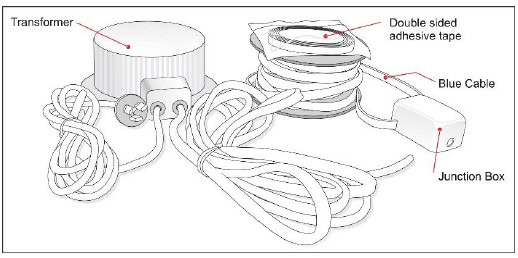
The Maxi kit contains a transformer, a 12-volt output lead, a junction box, a continuous loop of grey power cable and adhesive tape. The Mini uses a similar junction-box arrangement for a single direction. The Micro feeds the track directly from its transformer.

Manufacturer diagram identifying the Maxi transformer, adhesive tape, power cable and junction box
The Maxi junction box feeds the current grey cable in two directions. Some earlier diagrams show the former cable colour.

Planning one lamp? The published 60-watt instructions are based on at least two 7-watt LED lamps. Ask Shakespeare Solutions to confirm the appropriate lamp and transformer arrangement for a single-light installation.

2. Map the cable run and lamp load

Gallery Systems instruction

The Micro 60 and Mini 60 instructions specify two to eight 7-watt LED lamps over a maximum 9 m of Gallery System track. The Maxi 200 instructions place the junction box near the middle of the system and use the looped grey cable to feed both directions. Review the applicable manufacturer PDF at the end of this guide.

Shakespeare Solutions field notes

Voltage drop depends on the complete 12-volt path, the number and wattage of lamps, the position of the most distant lamp and the quality of every connection. A long cable can work well with a modest lamp load, but that does not make every long-run arrangement interchangeable.

Supplier-tested long run: a separate supplier test used a 70-watt transformer with four 7-watt lamps at the end of a 14 m power-cable run and reported that all four operated correctly. The same four lamps continued to work at 24 m, but adding further wands at that distance produced a visible reduction in light output. This is useful evidence for planning, not a replacement rating for the 60-watt kits or a guarantee for every cable layout.

For a run beyond the published basis, send us the floor plan, total cable route, track lengths, transformer position and intended lamp count. We can then confirm whether the standard kit arrangement is suitable or whether the layout should be divided.

A practical Maxi hallway example: a centrally positioned Maxi junction box may feed approximately 10 m of track in each direction. The transformer can potentially sit in an accessible, ventilated roof location using its supplied output lead to reach the junction box. This can avoid placing a separate transformer at each end, but the complete design, lamp count and cable lengths should be confirmed before ordering or concealing any cable.

3. Plan the track, junction and transformer positions

  • Track heightKeep the top edge of the track at least 20 mm below the ceiling or cornice so there is enough room for your fingers while fitting the light wands. For effective illumination, the manufacturer recommends installing the track no higher than 2.6 m from the floor.
  • Micro 60The transformer can sit at the track end, but this kit is also commonly used on partitions and displays. Where suitable, route the grey cable around a corner and tuck the transformer into an accessible, dry and ventilated frame or enclosure without creating a sharp bend.
  • Mini 60Leave a junction-box-sized gap at the track end. Confirm that the supplied transformer-to-junction cable reaches the selected transformer position.
  • Maxi 200Leave a junction-box-sized gap between track sections, preferably near the electrical centre of the lighting run so the grey cable can travel in both directions.
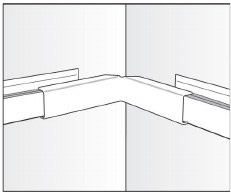
  • CornersAllow approximately 40 mm for the appropriate inside or outside corner cover, checking the gap against the actual cover before cutting the track. The cover conceals the exposed power cable as it turns the corner.
  • Transformer locationChoose an accessible, dry and ventilated position. Confirm the location of the mains outlet and the route of the safe 12-volt cable before fixing the track.

If lighting is being retrofitted to existing Gallery System track, mark the required transformer or junction-box gap against the actual component. Remove hangers from the immediate area, support the track securely and cut only after the complete cable route has been checked.

4. Prepare the cable channel and adhesive tape

Gallery Systems instruction

The supplied double-sided tape sits on the top horizontal surface of each powered track length. It is easiest to fit before the track is screwed to the wall, but it can also be installed after the track is in place. In either case, keep the adhesive and channel free of drilling dust and grit.

  1. Clean the upper channel. Vacuum or wipe away drilling dust and grit, then make sure the surface is dry before exposing the adhesive.
  2. Choose when to fit the tape. Fitting it before the track is installed gives easier access. If the track is already on the wall, work carefully along the open upper channel.
  3. Lay the tape straight. Run it continuously along the flat upper surface and press it down without wrinkles or gaps.
  4. Keep the paper cover on. Leave the protective paper in place until you are ready to seat the cable so the adhesive stays clean.
  5. Use the tape as a settling aid. It holds the grey cable in its initial position; once the cable has settled straight and true in the channel, it generally remains in place.

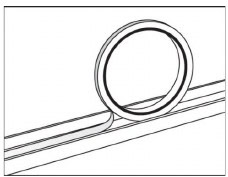
The tape belongs on the flat upper channel that carries the grey power cable. Whether the tape is fitted before or after the track, remove all dust before peeling back the paper and pressing in the cable.

Manufacturer diagram showing the power cable laid along the adhesive tape in the upper Gallery System track channel
The cable must lie straight on the taped upper surface.

5. Mount the transformer and junction box

Keep the power off. Do not connect the transformer to the mains supply until the junction box is closed, the grey cable is fully seated and all exposed cable has been checked.

  1. Mount the transformer. Use the manufacturer’s mounting provision in the predetermined accessible and ventilated position.
  2. Position the junction box. For Mini, place it at the selected track end. For Maxi, place it in the planned gap between the two powered runs. Micro has no separate junction box.
  3. Orient the cable exits. The track cable should leave the junction box level with the upper track channel. The transformer cable can leave above, below or pass through the back of the junction box into a prepared wall route.
  4. Fix the junction box. Use the pre-fitted adhesive tape or remove the cover and fix the base through its mounting holes with suitable 6-gauge screws. Refit the cover with each cable sitting in the correct slot.
  5. Conceal a surface cable if required. Use appropriately sized plastic conduit only where a visible 12-volt lead remains on the face of the wall. Surface conduit is not required where the cable is routed into the wall through the back of the junction box.

Fix the junction box before pressing cable into the track. This prevents the cable position from pulling the box out of alignment and allows the lid slots to guide each cable cleanly.

Manufacturer diagram of the Gallery Lighting junction box with cables leaving through its cover slots
Use the junction-box slots to keep each cable aligned.

6. Fit the grey power cable

Maxi 200: cut the loop before applying power. The continuous grey cable supplied with the Maxi kit must be cut into the two planned track runs before the transformer is energised. Never switch the system on while the loop remains electrically continuous; doing so will create a short circuit.

  1. Remove the tape paper. Work only on the length you are ready to cable so the adhesive stays clean.
  2. Keep the cable clean. Set the reel on a clean floor or protective surface and unroll it progressively. Do not drag the cable through drilling dust.
  3. Start at the power entry. For Micro, begin at the transformer. For Mini, begin at the junction box and work along the single run. For Maxi, complete one side from the junction box and then the other.
  4. Press the cable straight. Seat it firmly along the full taped surface without twists, loops or gaps.
  5. Trim at the track end. Cut only after the cable is fully seated to the end of that run. Do not leave an unplanned coil hidden behind a cover.
  6. Inspect before power. Make sure the junction-box lid is secure, every visible connection is protected and the cable has not been nicked or pinched.

Long-run check: temporarily test the completed layout with the intended lamps before concealing accessible 12-volt cable routes or completing decorative covers. Check the lamp furthest from the transformer while the remaining wands are added one at a time.

7. Fit and aim the light wands

Gallery Systems instruction

Use the correct Gallery Lighting lamps. The manufacturer recommends compatible 7-watt, warm-white 3000 K LED lamps with broad 60-degree coverage and warns against low-quality lamps or lamps above 20 watts, which can overheat the wand plastics or overload the transformer. Shakespeare Solutions recommends Philips Master LED globes.

  1. Fit the lamp to the wand. Confirm that it is the correct lamp for the selected wand and kit.
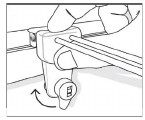
  2. Lower the lever. The wand’s track fitting must be unlocked before it is placed over the track.
  3. Hold the fitting square. Lower it over the track at a true right angle. A fitting introduced on a slight angle may not contact the grey cable.
  4. Lock the connection. Once fully seated, turn the lever half a turn clockwise.
  5. Switch on and test. Add the remaining wands progressively and check that illumination stays consistent, particularly at the far end of a long run.
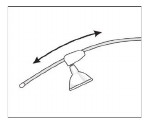
  6. Aim the light. Slide the lamp socket up or down the curved wand until the beam falls naturally over the artwork without excessive glare.
Manufacturer diagram showing a Gallery Lighting wand being lowered squarely onto the track and locked with its lever
Keep the fitting at a right angle while it is lowered and locked.
Manufacturer diagram showing the lamp socket sliding along the curved lighting wand to change its aim
Slide the lamp socket along the wand to adjust the beam.

8. Fit covers and finish the installation

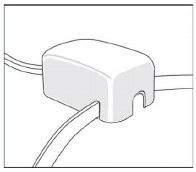
Use straight, inside-corner and outside-corner covers wherever the grey cable crosses a planned gap in the Gallery System track. Covers are available to match the white or silver track and should sit without crushing or sharply bending the cable.

Manufacturer diagram showing a Gallery Lighting inside-corner cover concealing the cable gap
Inside-corner cover.
Manufacturer diagram showing a Gallery Lighting outside-corner cover concealing the cable gap
Outside-corner cover.

Ongoing care: keep the transformer ventilation clear and wipe dust from the light wands periodically. If a wand becomes intermittent, switch the system off before checking the lamp, the square seating of the track fitting and the cleanliness of its contact area.

Troubleshooting

A newly fitted wand does not light

Switch the system off and check each connection in sequence. First, hold the wand fitting square over the track and squeeze the fitting and track together firmly by hand so the contact prongs seat properly into the grey cable. Do not rely on the locking key to pull the fitting down; it locks an already seated fitting in position. Run the lamp carriage back and forth along the wand to help its moving contacts connect cleanly, then make sure the lamp itself is fully seated in its housing. Lock the fitting only after everything is sitting correctly, then switch on and test.

The lamps become visibly dimmer as more wands are added

This indicates that the complete run is approaching a practical limit or has excessive resistance. Check the lamp wattages, transformer rating, junction connections and total cable route. Remove added wands and ask Shakespeare Solutions to review the floor plan before changing the transformer or cable arrangement.

The grey cable will not stay flat in the track

Switch off the system and lift the affected section. Dust, a twist in the cable or prematurely exposed adhesive can prevent reliable seating. Clean the track without damaging the cable, replace contaminated tape where necessary and press the cable down straight.

The transformer is getting unusually hot

Switch it off and do not continue using the system until its ventilation, lamp load and installation position have been checked. Never cover a transformer with ceiling insulation or enclose it in an unventilated space.

Manufacturer instructions

Keep the original Gallery Systems sheet for the selected kit with the installation. It contains the component diagrams and the manufacturer’s published configuration.

Planning a long, split or concealed installation? Send Shakespeare Solutions a floor plan, cable route and lamp count before ordering so the transformer and junction arrangement can be checked.

Posted on

How to remove the ‘Slimline Art Hanging System’ track from the wall?

Aluminium bar being used to pry the Slimline Art Hanging System track from the wall.

How to remove the ‘Slimline Art Hanging System’ track from the wall?

Moving home and want to take your ‘Slimline Art Hanging System‘ track with you? While it’s definitely possible to remove the track, we generally recommend leaving it in place for the next occupants and purchasing new track for your new space. Why? Well, removing it can be tricky and often leads to wall damage that will need repairing—so in many cases, replacing the track is actually the more economical option.

But, we understand that sometimes the track just needs to come down! Whether you’re rearranging or relocating, here’s the process I’ve found works best when removing the track from the wall.

A Quick Note Before You Begin:

If your track was installed directly into plasterboard using ‘Wall Mates,’ keep in mind that this process might cause some or all of the ‘Wall Mates’ to pull through the plasterboard leaving larger holes behind. Unfortunately, this is usually unavoidable. However, if your track was anchored into studs, masonry or a brick wall, the following steps should work smoothly.

Step-by-Step Guide to Removing the Slimline Art Hanging Track:

  1. Locate the first anchor: Start at one end of the track. To find the nearest anchor, either peek underneath the track or gently run a fine paperclip along the back of the track.
  2. Pry the track from the anchor: Find something soft (that won’t damage the track) to pry the track off the anchor. I personally use a 14mm wide x 2mm deep section of aluminum bar that I picked up from the hardware store which I insert into the channel of the track on top of an anchor location. While it might bend, it’s gentle on the track’s fascia and gets the job done without causing damage.  A flat head screw driver could be used but will cause damage, so it is best to look around and see what you can find.  Work gently and take your time, this is not a fast process.
  3. Work along the track: Once you’ve unclipped the first anchor, continue along the track, unclipping it from each anchor in sequence.
  4. Slide the track off: When there’s only one or two anchors left holding the track, you may be able to slide the entire track off those remaining anchors.
  5. Remove the anchors: With the track down, you just need to unscrew and remove the anchors from the wall.

The process is a bit tricky, so take your time and work methodically.  🙂   If you have other picture hanging system related questions please don’t hesitate to call or send an email.  We’d be delighted to help.

Good luck,

Ed Banks

Shakespeare Solutions.


Posted on

Price Rise – June 2022

Picture hanging system - The Gallery System

Dear Customers,

In June 2022 we will be increasing our prices after more than 10 years of keeping them steady. 🙁

Over this period we have absorbed incremental price rises from various suppliers and sought to offset these with ever greater business efficiencies.

Unfortunately we have experienced a large shift in the price of our factors of production which cannot be offset.  As an example, our courier & freight bill alone has increased by more than 400% since before COVID-19.

Thank you for your understanding and support.

Kind regards,


Ed Banks – Shakespeare Solutions – Owner.

Posted on

Picture Hanging Hardware – Load Test

Strap Hanger Load Test Image

Recently we added a range of picture hanging hardware with the mindset of supplying great quality and innovative products that fill users with confidence when hanging art.

We began this journey by purchasing samples from a number of manufacturers around the globe for evaluation.  Early on it became obvious that whilst many of the components looked similar they certainly were not!  

When considering the samples we compared the following:

  •     Thickness & weight of materials used
  •     Finish of the materials 
  •     Design of components 
  •     Craftsmanship of production – some pieces were much better stamped, created and assembled than others 

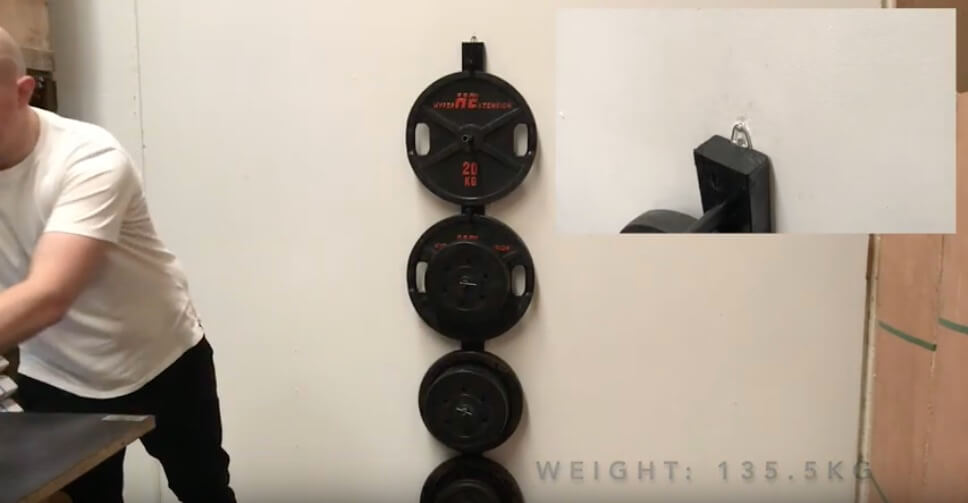
At this point we discarded a number of manufacturers who didn’t meet our standard and proceeded to additional testing with the remainder.  One of the key tests here was a ‘load test’ as per the video of the ‘strap hanger load test’ above.  

Whilst we do not recommend using any product outside it’s specification we want to demonstrate to you that we take product testing seriously so that you can be confident in the products we supply.  We hope you find the ‘load test video’ useful. 

It is our intention to continue to add products to our range inline with this philosophy.  Please do contact us if you have any requests or feedback.

Posted on

Picture Hanging Systems for Curved Walls

picture hanging system on curved walls

Both ‘The Gallery System’ and ‘Slimline Art Hanging System’ have some ability to absorb fluctuations that regularly occur in walls due to age or bricks that weren’t originally expected to be seen.  Sometimes a compromise has to be made but usually a solution can be found.  It is also true to say that both systems can conform to minor curves in walls although we highly recommend using extra wall anchors and fixings when installing in this fashion and certainly the ‘Slimline Art Hanging System’ is more forgiving in this application.  

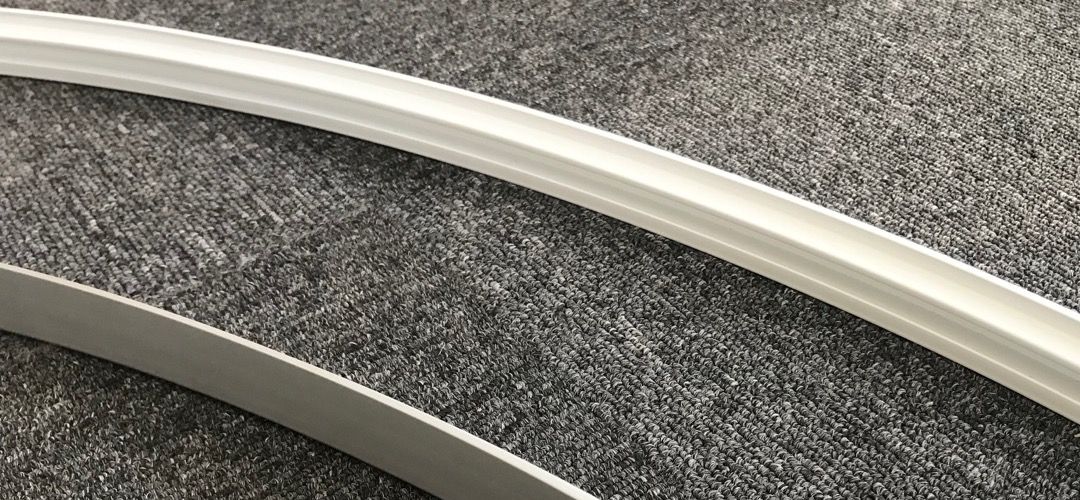
If however, you have some architecturally or otherwise design curved walls on which you are wanting to place a picture hanging system, then we have the solution for you!  The process is called ‘cold rolling’ and we have been working on developing a process to ensure we can provide neat curves to your specifications without damaging the surface of the track which would traditionally require refinishing at great expense.

For simply curves, please contact us with the radius of the required curves and the circumference lengths for a quotation.  We love a challenge though, should you have a more complex requirement please provide a drawing with the relevant specifications.

That’s all for this week! Do let me know if you have any picture hanging system questions! 

Cheers,

Ed Banks – Owner

Posted on

Troubleshooting The Gallery Lighting System

Gallery Lighting System Lighting wand prongs - hero image

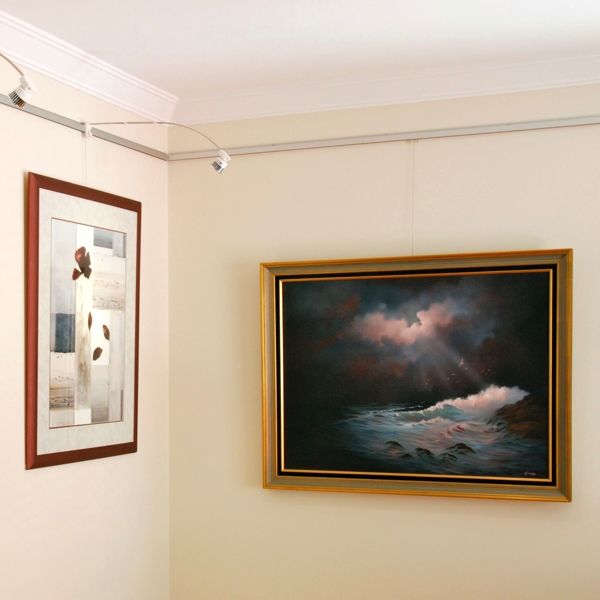
‘The Gallery Lighting System’ is an excellent addition to ‘The Gallery System’, it provides a dynamic and cost effective solution to lighting your artwork 

Over the years however we have had one reoccurring issue that sometimes causes the system not to work correctly or at all!  

If we look at the ‘Lighting Wand’ we can see that it has two prongs designed to bite into the low voltage ‘blue cable’ and provide current to the globe.  It is very important that these prongs make a good connection to provide the appropriate current to the globe.  Interestingly, in days gone by when we used incandescent globes, the globes would light up even if a proper connection was not made.  However, modern LED globes are far more digital and if they don’t receive a minimum current will not light up at all.  

Gallery Lighting System Track with Blue cableGallery Lighting System Lighting Wand Prongs

So, how do we ensure the Lighting Wand prongs are making appropriate contact with the blue cable?  

This is simply a case of installing the wands using the following method:

1. Turn the ‘key’ on the lighting wand to open the lock and allow the wand to mate with the track.

Gallery Lighting System Lighting Wand Prongs

2. Place the wand on the track with the flat edge of the lighting wand firmly (and flatly) against the track.

Gallery Lighting System PMating Wand to track

3. Using your hands, squeeze the lighting wand down onto the track and in turn seating the prongs into the blue cable.

Gallery Lighting System Squeezing Wand Onto Track

4. Now lock the lighting wand in place with the key.

Gallery Lighting System Locking Wand into place

The secret here is to ensure that the lighting wand is squeezed into place with one’s hands before locking it in place with the key.  Using the key to lock the wand in place without squeezing it down will lead to a poor connection at best and most likely no connect at all; subsequently the system not functioning correctly. 

Gallery Lighting System lighting wand correctly installed

Once you have done this once or twice it becomes second nature and is a quick and easy way of ensuring ‘The Gallery Lighting System’ is properly setup and will function correctly.

That’s all for this week, if you have any picture hanging system questions, please do let me know.  As always, I’d be delighted to help.

Cheers,

Ed Banks

Shakespeare Solutions.

Posted on

Ikea Picture Hanging System

image of Ikea building

Are you looking for a Picture Hanging System from IKEA?

Over the years we have had a number of customers that have been looking for a Picture Hanging System they viewed at IKEA but actually IKEA has never sold a system in Australia! 

Don’t despair, we can help you hang your PJÄTTERYD pictures and Ribba frames with our brilliant range of picture hanging systems and hanging products.  Sure… they were designed by a bloke named Bruce and not a lad called Lars but we are confident you will find our Aussie designed (and it some cases made) products up to the task of displaying your decor!

As you have managed to find this secret post, apply the following code (or mention it to team member on the phone) to receive a 10% discount on your order. (valid until 30/09/2019)

‘brucenotlars’

The best place to start your search is on our Shakespeare Solutions homepage which introduces the picture hanging systems, however if you are after a system for home, you will most likely want to consider the ‘Slimline Art Hanging System‘.

We ship Free of charge Australia wide, have a money back satisfaction guarantee and a best price policy.  Do let us know how we can assist. 🙂

Cheers,


Ed Banks – Shakespeare Solutions.

Posted on

Installing Muuto Dots in Plasterboard Walls

Muuto Dots Installed on Plasterboard no studs

‘Mutto Dots are a characteristic family of hooks that make a friendly addition to any wall’ is what is written on the box and I quite agree!

The problem with these friendly hooks is that they can be decidedly unfriendly if you are trying to install them into a hollow wall as inevitably your better half will not want them placed inline with the existing studs. This means you have to try and secure the large (14 gauge) self tapping screw which comes with the Muuto Dot directly into the board; a task which means installing extra timber in the wall, patching and repainting… until now…

The GeeFix Fixings are the ideal solution to this problem. The fixing itself is more than capable of handling the weight of your wifes handbag, your Child’s school bag or evening your child! (Although climbing on them is very much not recommended!) More importantly they are able to accept a wide range of threads including that which comes with the Muuto Dot.

We recommend the following installation method in plasterboard or hollow board walls:

1. Decide where the ‘Muuto Dots’ are to be installed and lightly mark with a pencil.
2. With a stud finder (or the tapping method) identify if any are on or near the studs. Any that are on the edge of a stud consider moving across.
3. Install any that are on the stud by drilling a hole and screwing the ‘Muuto Dot’ in.
4. Where a stud cannot be found, install a ‘GeeFix’ Fixing as per the instructions. (In addition to the fixing you will require a 25mm hole saw or spade bit)
5. With the GeeFix Fixing in place, simply screw the ‘Muuto Dot’ into place.
6. Stand back and enjoy your handy work, knowing the Dot has been well secured and will not require further attention in the future.

Can I use this method if I has already tried installing the ‘Muuto Dots’ without the ‘GeeFix’ Fixings?  Yes, absolutely! One of the great features of these fixings, is that you can remove any existing fixing by drilling around it with a hole saw and replacing with a ‘GeeFix’

‘GeeFix’ Fixing can be purchased in packs of 4, 5 or 50 on the product page. Alternatively if you are interesting in retailing the ‘GeeFix’ Fixings please contact me directly.  Please do let me know if we can assist with this product or any of our Picture Hanging Systems.

That’s all for this week!

Cheers,

Ed Banks
Shakespeare Solutions.