
Safety first
The lighting side of the system operates at 12 volts and is designed for DIY handling. Do not alter the 240-volt plug, lead or mains supply. A new power point, concealed mains wiring or any other change to the 240-volt supply must be completed by a licensed electrician. Keep the transformer switched off while the track cable and light wands are being installed.
Mount the transformer where it remains accessible and well ventilated. A transformer placed above a ceiling must not be buried in insulation or sealed into an inaccessible void. Check the proposed location with your electrician before the track or cable is cut.
Before you begin
This guide covers adding Gallery Lighting to The Gallery System track. If the track has not yet been installed, begin with How to install The Gallery System. Lighting affects the track height, junction-box position and corner gaps, so it is best planned before the track is fixed even when the lighting will be added later.
- Tape measure, pencil and floor plan
- Selected Micro, Mini or Maxi lighting kit
- Gallery System track and suitable fixings
- Fine-tooth hacksaw and mitre box
- Double-sided cable tape supplied with the kit
- Small screwdriver for the junction-box cover
- Stable ladder or work platform
- Correct Gallery Lighting wands and lamps
- Plastic conduit if surface cable will remain visible
- Eye protection and appropriate drilling protection
Have a floor plan ready. Mark the track lengths, corners, transformer location, available power points, approximate cable route and intended number of lamps. This makes it much easier to choose the correct kit and identify a non-standard cable run before installation begins.
1. Choose the lighting kit
The three kits use the same Gallery System track and light wands, but they introduce power differently. Choose the layout first; transformer capacity alone does not tell you where the transformer, junction box and cable should go.
| Kit | Power arrangement | Published planning basis | Usually suits |
|---|---|---|---|
| Micro 60 | Grey 12-volt cable connects directly to the transformer. There is no separate junction box. | Two to eight 7-watt LED lamps over up to 9 m of track. | A simple one-direction run, partition or display. The transformer may sit at the track end or in another suitable position reached by routing the cable around a corner or into a frame. |
| Mini 60 | A 3 m grey output cable runs from the transformer to a white junction box, then a separate grey cable enters the track. | Two to eight 7-watt LED lamps over up to 9 m of track. The manufacturer states 4.45 m from junction box to 240-volt plug, including the mains lead. | A small run where the transformer needs to be away from the visible track. |
| Maxi 200 | A black 12-volt lead runs from the transformer to a central white junction box. The looped grey cable can then feed the track in two directions. | The supplied transformer-to-junction lead is 3 m. The junction should be positioned near the middle of the lighting run. | Larger rooms, more lamps and split or two-direction layouts. |
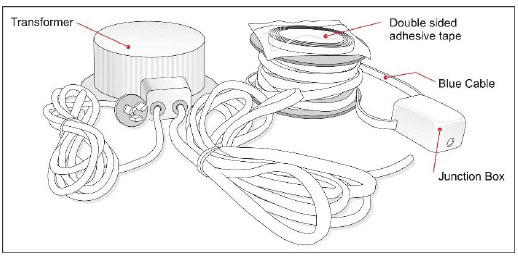
The Maxi kit contains a transformer, a 12-volt output lead, a junction box, a continuous loop of grey power cable and adhesive tape. The Mini uses a similar junction-box arrangement for a single direction. The Micro feeds the track directly from its transformer.
Planning one lamp? The published 60-watt instructions are based on at least two 7-watt LED lamps. Ask Shakespeare Solutions to confirm the appropriate lamp and transformer arrangement for a single-light installation.
2. Map the cable run and lamp load
Gallery Systems instruction
The Micro 60 and Mini 60 instructions specify two to eight 7-watt LED lamps over a maximum 9 m of Gallery System track. The Maxi 200 instructions place the junction box near the middle of the system and use the looped grey cable to feed both directions. Review the applicable manufacturer PDF at the end of this guide.
Shakespeare Solutions field notes
Voltage drop depends on the complete 12-volt path, the number and wattage of lamps, the position of the most distant lamp and the quality of every connection. A long cable can work well with a modest lamp load, but that does not make every long-run arrangement interchangeable.
Supplier-tested long run: a separate supplier test used a 70-watt transformer with four 7-watt lamps at the end of a 14 m power-cable run and reported that all four operated correctly. The same four lamps continued to work at 24 m, but adding further wands at that distance produced a visible reduction in light output. This is useful evidence for planning, not a replacement rating for the 60-watt kits or a guarantee for every cable layout.
For a run beyond the published basis, send us the floor plan, total cable route, track lengths, transformer position and intended lamp count. We can then confirm whether the standard kit arrangement is suitable or whether the layout should be divided.
A practical Maxi hallway example: a centrally positioned Maxi junction box may feed approximately 10 m of track in each direction. The transformer can potentially sit in an accessible, ventilated roof location using its supplied output lead to reach the junction box. This can avoid placing a separate transformer at each end, but the complete design, lamp count and cable lengths should be confirmed before ordering or concealing any cable.
3. Plan the track, junction and transformer positions
- Track heightKeep the top edge of the track at least 20 mm below the ceiling or cornice so there is enough room for your fingers while fitting the light wands. For effective illumination, the manufacturer recommends installing the track no higher than 2.6 m from the floor.
- Micro 60The transformer can sit at the track end, but this kit is also commonly used on partitions and displays. Where suitable, route the grey cable around a corner and tuck the transformer into an accessible, dry and ventilated frame or enclosure without creating a sharp bend.
- Mini 60Leave a junction-box-sized gap at the track end. Confirm that the supplied transformer-to-junction cable reaches the selected transformer position.
- Maxi 200Leave a junction-box-sized gap between track sections, preferably near the electrical centre of the lighting run so the grey cable can travel in both directions.
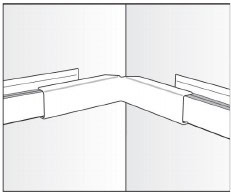
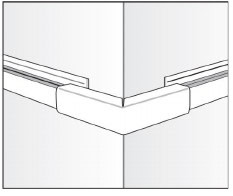
- CornersAllow approximately 40 mm for the appropriate inside or outside corner cover, checking the gap against the actual cover before cutting the track. The cover conceals the exposed power cable as it turns the corner.
- Transformer locationChoose an accessible, dry and ventilated position. Confirm the location of the mains outlet and the route of the safe 12-volt cable before fixing the track.
If lighting is being retrofitted to existing Gallery System track, mark the required transformer or junction-box gap against the actual component. Remove hangers from the immediate area, support the track securely and cut only after the complete cable route has been checked.
4. Prepare the cable channel and adhesive tape
Gallery Systems instruction
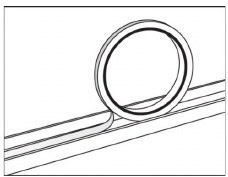
The supplied double-sided tape sits on the top horizontal surface of each powered track length. It is easiest to fit before the track is screwed to the wall, but it can also be installed after the track is in place. In either case, keep the adhesive and channel free of drilling dust and grit.
- Clean the upper channel. Vacuum or wipe away drilling dust and grit, then make sure the surface is dry before exposing the adhesive.
- Choose when to fit the tape. Fitting it before the track is installed gives easier access. If the track is already on the wall, work carefully along the open upper channel.
- Lay the tape straight. Run it continuously along the flat upper surface and press it down without wrinkles or gaps.
- Keep the paper cover on. Leave the protective paper in place until you are ready to seat the cable so the adhesive stays clean.
- Use the tape as a settling aid. It holds the grey cable in its initial position; once the cable has settled straight and true in the channel, it generally remains in place.
The tape belongs on the flat upper channel that carries the grey power cable. Whether the tape is fitted before or after the track, remove all dust before peeling back the paper and pressing in the cable.
5. Mount the transformer and junction box
Keep the power off. Do not connect the transformer to the mains supply until the junction box is closed, the grey cable is fully seated and all exposed cable has been checked.
- Mount the transformer. Use the manufacturer’s mounting provision in the predetermined accessible and ventilated position.
- Position the junction box. For Mini, place it at the selected track end. For Maxi, place it in the planned gap between the two powered runs. Micro has no separate junction box.
- Orient the cable exits. The track cable should leave the junction box level with the upper track channel. The transformer cable can leave above, below or pass through the back of the junction box into a prepared wall route.
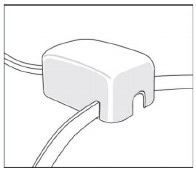
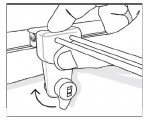
- Fix the junction box. Use the pre-fitted adhesive tape or remove the cover and fix the base through its mounting holes with suitable 6-gauge screws. Refit the cover with each cable sitting in the correct slot.
- Conceal a surface cable if required. Use appropriately sized plastic conduit only where a visible 12-volt lead remains on the face of the wall. Surface conduit is not required where the cable is routed into the wall through the back of the junction box.
Fix the junction box before pressing cable into the track. This prevents the cable position from pulling the box out of alignment and allows the lid slots to guide each cable cleanly.
6. Fit the grey power cable
Maxi 200: cut the loop before applying power. The continuous grey cable supplied with the Maxi kit must be cut into the two planned track runs before the transformer is energised. Never switch the system on while the loop remains electrically continuous; doing so will create a short circuit.
- Remove the tape paper. Work only on the length you are ready to cable so the adhesive stays clean.
- Keep the cable clean. Set the reel on a clean floor or protective surface and unroll it progressively. Do not drag the cable through drilling dust.
- Start at the power entry. For Micro, begin at the transformer. For Mini, begin at the junction box and work along the single run. For Maxi, complete one side from the junction box and then the other.
- Press the cable straight. Seat it firmly along the full taped surface without twists, loops or gaps.
- Trim at the track end. Cut only after the cable is fully seated to the end of that run. Do not leave an unplanned coil hidden behind a cover.
- Inspect before power. Make sure the junction-box lid is secure, every visible connection is protected and the cable has not been nicked or pinched.
Long-run check: temporarily test the completed layout with the intended lamps before concealing accessible 12-volt cable routes or completing decorative covers. Check the lamp furthest from the transformer while the remaining wands are added one at a time.
7. Fit and aim the light wands
Gallery Systems instruction
Use the correct Gallery Lighting lamps. The manufacturer recommends compatible 7-watt, warm-white 3000 K LED lamps with broad 60-degree coverage and warns against low-quality lamps or lamps above 20 watts, which can overheat the wand plastics or overload the transformer. Shakespeare Solutions recommends Philips Master LED globes.
- Fit the lamp to the wand. Confirm that it is the correct lamp for the selected wand and kit.
- Lower the lever. The wand’s track fitting must be unlocked before it is placed over the track.
- Hold the fitting square. Lower it over the track at a true right angle. A fitting introduced on a slight angle may not contact the grey cable.
- Lock the connection. Once fully seated, turn the lever half a turn clockwise.
- Switch on and test. Add the remaining wands progressively and check that illumination stays consistent, particularly at the far end of a long run.
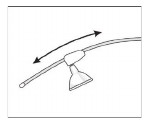
- Aim the light. Slide the lamp socket up or down the curved wand until the beam falls naturally over the artwork without excessive glare.
8. Fit covers and finish the installation
Use straight, inside-corner and outside-corner covers wherever the grey cable crosses a planned gap in the Gallery System track. Covers are available to match the white or silver track and should sit without crushing or sharply bending the cable.
Ongoing care: keep the transformer ventilation clear and wipe dust from the light wands periodically. If a wand becomes intermittent, switch the system off before checking the lamp, the square seating of the track fitting and the cleanliness of its contact area.
Troubleshooting
A newly fitted wand does not light
Switch the system off and check each connection in sequence. First, hold the wand fitting square over the track and squeeze the fitting and track together firmly by hand so the contact prongs seat properly into the grey cable. Do not rely on the locking key to pull the fitting down; it locks an already seated fitting in position. Run the lamp carriage back and forth along the wand to help its moving contacts connect cleanly, then make sure the lamp itself is fully seated in its housing. Lock the fitting only after everything is sitting correctly, then switch on and test.
The lamps become visibly dimmer as more wands are added
This indicates that the complete run is approaching a practical limit or has excessive resistance. Check the lamp wattages, transformer rating, junction connections and total cable route. Remove added wands and ask Shakespeare Solutions to review the floor plan before changing the transformer or cable arrangement.
The grey cable will not stay flat in the track
Switch off the system and lift the affected section. Dust, a twist in the cable or prematurely exposed adhesive can prevent reliable seating. Clean the track without damaging the cable, replace contaminated tape where necessary and press the cable down straight.
The transformer is getting unusually hot
Switch it off and do not continue using the system until its ventilation, lamp load and installation position have been checked. Never cover a transformer with ceiling insulation or enclose it in an unventilated space.
Manufacturer instructions
Keep the original Gallery Systems sheet for the selected kit with the installation. It contains the component diagrams and the manufacturer’s published configuration.
Planning a long, split or concealed installation? Send Shakespeare Solutions a floor plan, cable route and lamp count before ordering so the transformer and junction arrangement can be checked.